Yes this has been reviewed multiple times (here) as well as talked about on one of my favorite podcasts Security Now (transcript), but I just had to let the people who look at my blog (all 8 of you lol) how great it is. Here is a picture of it:
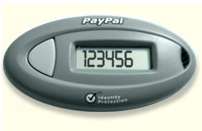
This hangs on my keychain and has a button that when I press on it gives me a 6 digit number which I can then use to log into paypal.
In fact I just used it to login to paypal to help my buddy Matt get his Dad a new wii at http://www.mydadneedsawii.com/. Please check it out and donate a dollar or two.
So here are the steps to using the Paypal Security device:
1) Goto http://www.mydadneedsawii.com/
2) Click on the Donate button on the right
3) Enter an amount (ie $5) and click Update Total
4) Enter your paypal email and password
5) Then instead of logging you in you are presented with a box to enter your 6 digit security code from your Paypal FOB.
So that is it. Pretty simple and makes your paypal account alot more secure. Check out more on the paypal site.. You also get to use the same key for your eBay login!
Nice for 2 reasons! First, I now see what you’ve been telling me about with this security FOB. Second, you donated to the cause to get my dad a Wii!
Matt S.s last blog post..My Dad Needs a Wii
I personally hate paypal, when you are a seller you have to watch out for scammers!